
*
By 2026 most of Internet usage takes place on mobile phones. More than half of it.
So it’s obvious that your site and content have to be mobile friendly.
Google also requires that your site
- fits mobiles interfaces
- is loading as fast as possible
- and is also usable on small screens.
Yet Google also has some fine print you may discover too late. What is it?
Is it hard to make a site mobile friendly?
The good news first: making a site mobile-friendly is easy.
Modern WordPress themes and website templates for other tools are mobile friendly from the start.
I have even converted my custom built and decade+ old main site to responsive web design myself. How?
I managed to do it myself even though I don’t work as a web developer since 2004 anymore either.
It took me half an hour here and there of tweaking and testing.
The bad news second: under the guise of making your site mobile-friendly Google blackmails you!
How that?
They force you into giving them your visual content (images) and access to the private parts of your site.
You have to grant Google access to your styles and scripts. Why?
What happens when you refuse?
They threaten you with a penalty when you don’t give away your images, styles and scripts.
Responding to the call of responsive design
This is not a blog about pleasing Google as might already know.
I have been advocating responsive aka mobile-friendly web design for many years.
I have started using a responsive WordPress theme on my blog here at the beginning of 2013 which was a bit late I have to admit.
I have also neglected my main homepage badly over the years. This is the price of success.
I had always so much client work that I never took the time to redesign or relaunch it.
It was also a matter of “if it’s not broken, don’t fix it” or “never change a running system”.
One day I have finally taken the time to make my site responsive
and to learn the basics of mobile-friendly design in the process. To be honest it was easier than expected.
Despite of several years of inactivity my web development muscle seemed to still be strong.
On the other hand the measures taken were not so hard to implement objectively.
Remember that I speak about a self-coded website from an era before Facebook, Google Chrome or Android existed.
For a modern CMS like WordPress with a legacy theme you just needed to switch themes in the best case.
Additionally new themes usually look far better than old ones and offer a much better user experience in general.
Google threatens publishers again
In this post I focus on the issue of letting Google access your
- images
- scripts
- styles
or face a penalty. Will your site really get penalized for not conforming with that sneaky demand?
Well, consider Google.com itself.
It was labelled as “mobile-friendly” in Google’s own testing tool despite hiding images and scripts.
The tool even said which files were hidden:
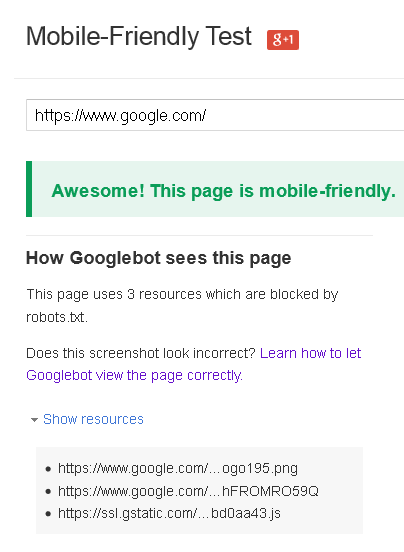
According to Barry Schwartz of Search Engine Roundtable there are no shades of grey when it comes to mobile-friendliness.
It’s all or nothing. Either you surrender your content and let Google use all of it as theirs or you lose visibility in search.
Give your images to Google or face their wrath
When you are mobile-friendly your site it at no risk of getting penalized even despite the missing resources Google can’t see.
That’s good news for Google itself. It doesn’t have to penalize its own site!
Average publishers and content creators like you and me aren’t that lucky usually.
They have to hand over their images to Google. Why?
Google redesigned it’s “Google Image Search”.
Ever since the search traffic monopolist requires to give up your images or get penalized.
Image copyright holders who ask Google users at least to click through are affected.
When overlaying their images grabbed by Google they are threatened by a so called image mismatch penalty.
Later on Google reframed it as “cloaked images“:
“Serving images to Google that are obscured by another image, for example: a block of text blocking an image.”
What does this mean in plain English?
Google wants to display your images on Google but forbids you to ask users to click through to your site!
You can’t run, you can’t hide
Until now there was one simple and radical solution to overcome the problem of Google image theft:
blocking Google from accessing your images in the robots.txt for example.
Indeed Google.com itself blocks access to their “/images” directory and other directories with images in them.
The Google.com robots.txt file says as of late 2025:
Disallow: /hosted/images/Another common issue is that of having to show your stylesheets and client-side scripts to Google.
This way they can find out whether you hide content for example or load it on demand. Why is this a problem?
Google wants to control your site
Google claims its spiders need access to those resources to be able to determine whether your site is truly mobile-friendly.
At first I was inclined to believe this explanation in spite of years of double-speak from Google spokespeople.
Yet, soon I noticed a pattern of reports from webmasters who claimed that they got penalized.
They got demoted for hiding site elements by using CSS or JS. Why did they hide them? Well,
in order to unclutter your site you often have to hide certain elements that are not needed al of the time or from the start.
There is even a large trend of so called hamburger menus, where most links are hidden.
Google.com itself has numerous hidden links on its site despite not even having a so called hamburger menu.
They even link to external properties they own like YouTube in the source code of the main Google.com site.
I couldn’t find that link in the visible area, not even on demand.
Are you hiding from Google or simply decluttering?
Tests have shown that hamburger menus have a positive impact on conversion rates for mobile users.
In other words hiding stuff from your users makes you earn more money but Google will penalize you for it.
Now you have to decide. Do you want to please Google?
- Do you want to give them all your visual content?
- Do you want and disclose all of your trade secrets?
- Do you want them to look below the hood of your website?
Or do you just want mobile users to be able to view your site properly?
My advice is to optimize for people.
Make our site people-friendly, be it on the go or at home.
When Google becomes a problem try to mitigate the risk.
Yet don’t yield to the pressure without fighting back or at least civil disobedience.
They want to steal your images or penalize you?
Penalize them by shutting your doors and becoming friends with people not bots.
* (CC BY 2.0) Creative Commons image by Dimitar Nikolov
Related posts:
What Does My Bounce Rate Really Mean?
SEO is Alive! Celebrate with an Online Presence Consultation!
Where to Buy Links? How to Get Link Juice? Do Follow SEO Advice!
Why SEO is Dead Serious: Google Hates Humor! #seohorrorstories
SEO Works! How? Step by Step + Project Examples
What the Heaven is Paradise SEO? The Garden Eden of Natural Links
Social SEO Metrics to Use Instead of Website Traffic
The Google Search Algorithm Explained in a Nutshell
WTF is "Parasite SEO"? Is SEO Really "Ruining the Internet"?